Complete feature overview

Less switching. Less administration. More time for clients.

DaliCares connects clients, bookings, documentation, forms, invoices and teamwork in one clear working environment.

No payment card · Full version · Works on desktop, tablet and mobile
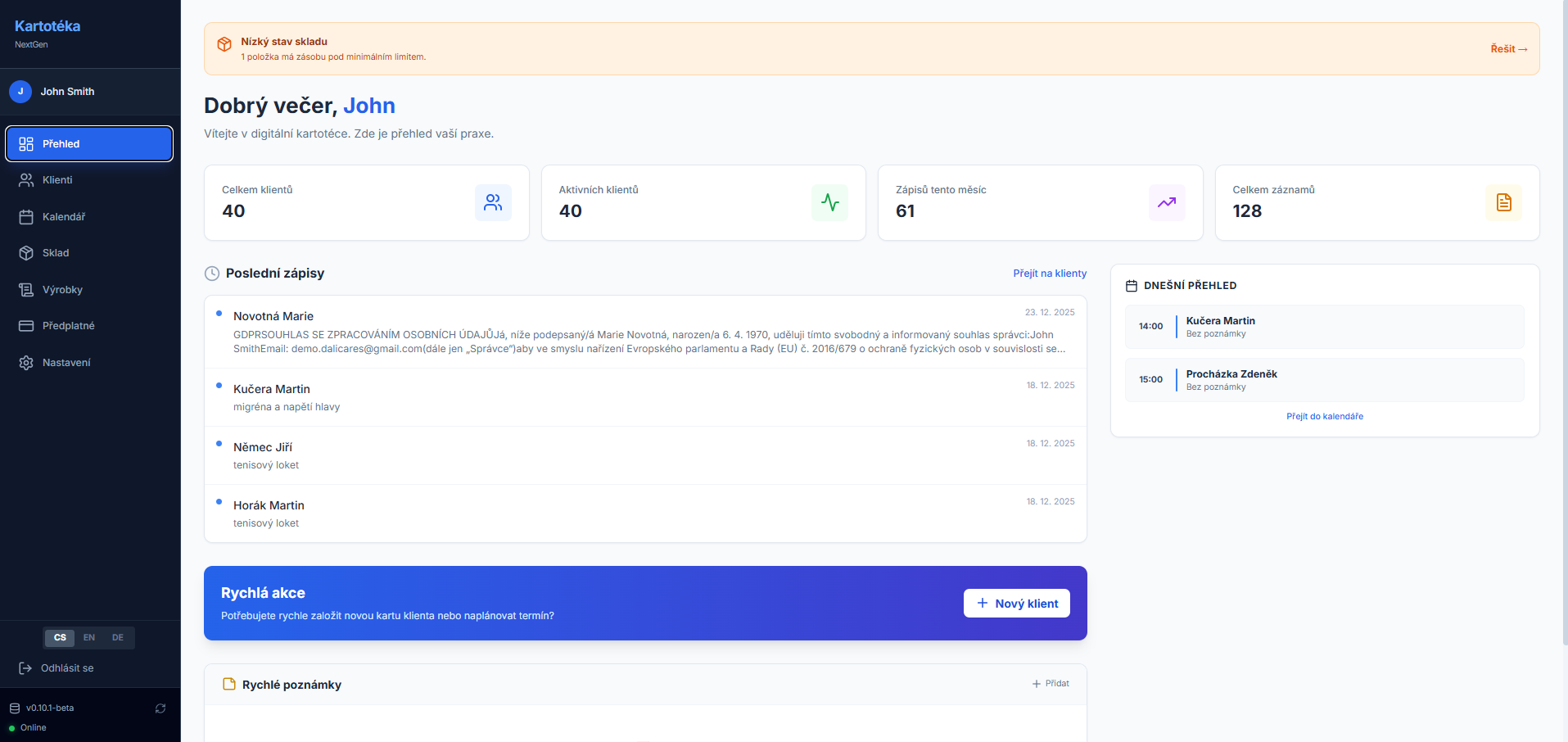
Main DaliCares application dashboard

Client records

Clients, history, records, documents and attachments in one place.

Booking and automation

Online booking, confirmations, instructions, forms and follow-up communication.

E-signatures and GDPR documents

Consents, forms and documents signed electronically and stored with the client.

Laboratory results and AI

Values, history, trends and AI import from documents and stored attachments.

One connected workflow

From the first booking to follow-up care

Individual parts of the system follow naturally. Enter information once and continue using it across the entire workflow.

  1. 1 Booking
  2. 2 Client
  3. 3 Record
  4. 4 Documents
  5. 5 Results
  6. 6 Invoice
  7. 7 Follow-up

Everyday work without chaos

Everything important exactly where you need it

DaliCares is not a collection of disconnected modules. It is one working system built around the client and the real operation of your practice.

Clients and documentation

No searching before the next appointment.

Open the client and immediately see history, notes, documents, attachments and important context.

  • Complete client record and appointment history
  • Custom therapy note structures
  • Notes, tags and important information
  • Body map and visual therapy resources
  • Photos, PDFs, DOCX files and attachments
  • Preview supported documents directly in the app

Booking and automation

The client books. DaliCares handles the rest.

The appointment, client and follow-up communication stay connected. Confirmations, instructions and documents can be sent automatically.

  • Clear calendar and capacity planning
  • Public online booking available 24/7
  • In-person and online consultations
  • Short and stable booking link
  • Automated confirmations and custom email templates
  • Forms, instructions and attachments by booking type

Forms, results and AI

Less paperwork before and after appointments.

Clients can complete a form, sign a document or securely upload an attachment before the appointment.

  • Custom questionnaires and forms
  • Electronic signatures and consents
  • Public links without client login
  • Secure public attachment upload
  • Laboratory values, history and trends
  • AI import of laboratory results from documents and attachments

Your entire practice

Administration, team and operations in one system.

From invoicing and inventory to team permissions. Start independently and add more when you need it.

  • Invoices and PDF documents without repeated typing
  • Products, materials and stock movements
  • Statistics and practice development overview
  • TEAM mode for owners, therapists and assistants
  • Roles, permissions and shared settings
  • Offline mode and CZ / EN / DE interface

Complete overview

And much more

The main workflow remains simple. Beneath the surface, you have the functions needed for everyday solo and team practice operations.

Clients and records

  • Client records and contacts
  • Appointment and note history
  • Custom note structures
  • Client tags and classification
  • Body map
  • Photos and attachments
  • PDF and DOCX previews
  • Client record search

Calendar and communication

  • Appointment calendar
  • Public online booking
  • In-person and online consultations
  • Automated confirmations
  • Custom email templates
  • Attachments by booking type
  • Communication under the therapist name
  • Team calendar overview

Forms and documents

  • Custom client forms
  • Internal practice forms
  • Electronic signatures
  • Consents and GDPR documents
  • Public client links
  • Public attachment upload
  • Documents stored with the client
  • PDF outputs

Laboratory results

  • Laboratory panels
  • Values and reference ranges
  • History of individual tests
  • Charts and long-term trends
  • AI import from PDFs and images
  • Import from stored attachments
  • Review of extracted values
  • Your own professional evaluation

Billing and inventory

  • Invoice creation
  • Automatic use of client details
  • PDF invoices
  • Products and services
  • Inventory items
  • Stock receipts and issues
  • Stock movement records
  • Basic operational statistics

Team and permissions

  • Owner role
  • Therapist role
  • Assistant role
  • Shared workspace
  • Separate user accounts
  • Role-based permissions
  • Shared note structures
  • Shared tags and settings

Offline and devices

  • Work during internet outages
  • Automatic synchronisation
  • Desktop, tablet and mobile
  • Responsive interface
  • Install as a PWA
  • One account on multiple devices
  • Czech, English and German
  • Continuous application updates

Security and GDPR

  • User access management
  • Separate team accounts
  • Electronic consents
  • Client data management
  • Client data export
  • Data deletion options
  • Cloud synchronisation
  • Work with confidential information

A simple start

You do not have to migrate your entire practice in one day.

Start with one real client. Add other features gradually as you need them.

01

Create your account

No payment card and no complicated installation.

02

Add your first client

Try the client record, first note or booking.

03

Add your practice gradually

Forms, invoices, inventory or a team can be added when you need them.

Try one complete workflow in your own practice.

Create a client, schedule an appointment and make your first note. No payment card, no commitment and free help getting started.

← Back to the homepage